How to Beat ATS in 2026: The Complete Guide to ATS-Friendly Resumes
Up to 75% of resumes are rejected by Applicant Tracking Systems before a human sees them. Learn the exact formatting rules, keyword strategies, and optimization techniques to make sure your resume passes ATS screening every time.
What Is an ATS and Why Does It Matter?
An Applicant Tracking System (ATS) is software that employers use to collect, filter, and rank job applications before a human recruiter ever sees them. In 2026, over 97% of Fortune 500 companies and 75% of mid-sized businesses rely on an ATS to process incoming resumes.
Here's the hard truth: up to 75% of resumes are rejected by ATS software before reaching a hiring manager. That means your qualifications, experience, and skills may never be seen -- not because you're unqualified, but because your resume formatting trips up an automated parser.
The most widely used ATS platforms include Workday, Greenhouse, Lever, iCIMS, Taleo, and BambooHR. Each one parses resumes slightly differently, but they all share common expectations about formatting, structure, and keywords.
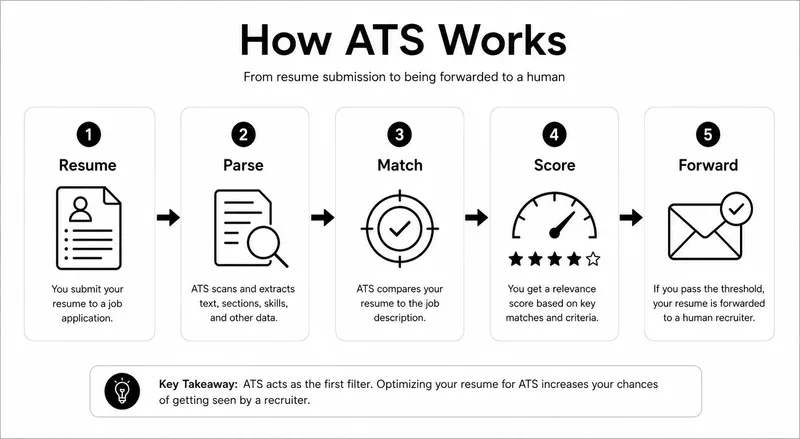
How ATS Software Actually Reads Your Resume in 2026
Modern ATS platforms have evolved beyond simple keyword matching. In 2026, many systems use AI-powered natural language processing (NLP) to understand context, not just scan for exact words. Here's how the process works:
- Document parsing -- The ATS extracts text from your file (PDF, DOCX, or plain text). Complex layouts, tables, headers/footers, and embedded images can break this step entirely.
- Section identification -- The system looks for standard resume sections: Contact Information, Work Experience, Education, Skills, and Certifications.
- Keyword extraction -- Your resume content is compared against the job description. The ATS identifies hard skills, soft skills, job titles, certifications, and industry-specific terminology.
- Scoring and ranking -- Each resume receives a relevance score. Recruiters typically only review the top 10-25% of scored applications.
Understanding this pipeline is the first step to ensuring your resume survives it.
9 Formatting Mistakes That Get Resumes Instantly Rejected
Before worrying about content, you need to make sure the ATS can actually read your resume. These formatting errors cause immediate parsing failures:
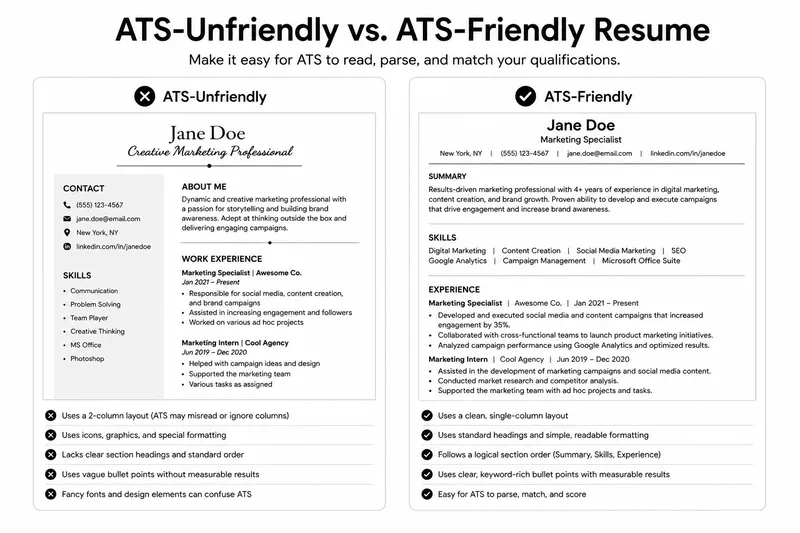
1. Using tables or columns for layout
Two-column layouts look great to humans but confuse most ATS parsers. The system reads left-to-right, top-to-bottom -- a two-column layout scrambles your content into nonsensical fragments. Stick to a single-column layout for ATS compatibility.
2. Placing key information in headers or footers
Many ATS platforms completely ignore document headers and footers. If your name, phone number, or email is in the header, the system may process your resume as belonging to an anonymous applicant.
3. Using text boxes or graphics
Infographic resumes, skill bars, pie charts, and text boxes are invisible to ATS software. Any information placed inside a graphic element is lost during parsing.
4. Choosing decorative or uncommon fonts
Stick to standard, widely-supported fonts: Arial, Calibri, Cambria, Georgia, Helvetica, or Times New Roman. Decorative fonts may render as garbled characters or fail to parse entirely.
5. Submitting the wrong file format
When the job posting doesn't specify a format, PDF is the safest choice in 2026 -- most modern ATS platforms handle PDF reliably. Avoid .pages, .odt, or image-based PDFs (scanned documents).
6. Using creative section headings
An ATS looks for standard headings like "Work Experience," "Education," and "Skills." Creative alternatives like "Where I've Made an Impact" or "My Toolbox" may cause the system to misfile or skip entire sections.
7. Inconsistent date formatting
Use a consistent format throughout: "Month Year - Month Year" (e.g., "January 2023 - Present"). Avoid abbreviations, slashes, or quarter-based dates that parsers may misinterpret.
8. Including special characters or icons
Unicode icons, bullet symbols beyond standard dots, and special characters can break ATS parsing. Use simple bullet points and plain text for contact details.
9. Overly long or overly short resumes
For most professionals, one to two pages is the sweet spot. ATS systems can handle longer documents, but recruiters who do see your resume expect concise, relevant content.
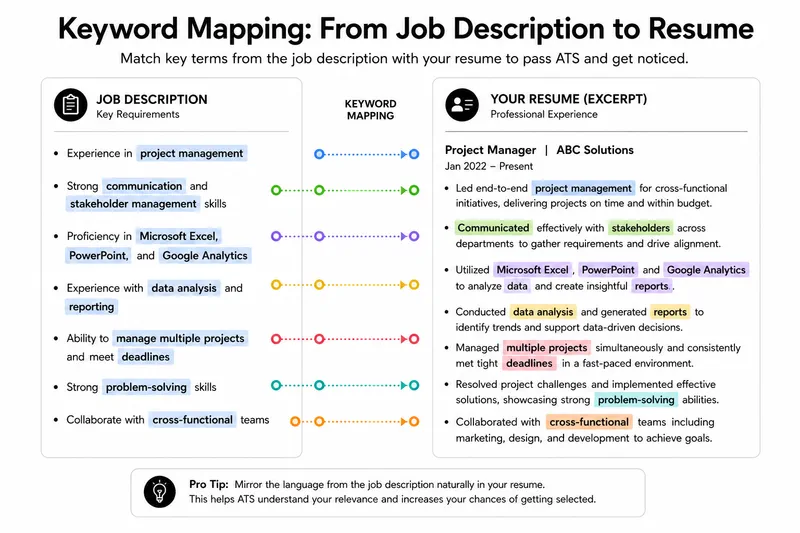
Keyword Optimization: The Core of ATS Success
Even with perfect formatting, your resume won't score well without the right keywords. Here's a strategic approach to keyword optimization:
Step 1: Analyze the job description
Read the job posting carefully and highlight every skill, qualification, tool, and certification mentioned. Pay special attention to:
- Required technical skills and tools (e.g., "Python," "Salesforce," "Google Analytics")
- Certifications (e.g., "PMP," "AWS Certified," "CPA")
- Soft skills mentioned more than once (e.g., "cross-functional collaboration")
- The exact job title used in the posting
Step 2: Mirror the language naturally
If the job description says "project management," don't substitute "PM" or "managing projects." Use the exact phrasing from the posting, integrated naturally into your experience descriptions. ATS systems in 2026 are better at understanding synonyms, but exact matches still score highest.
Step 3: Include both acronyms and full terms
Write "Search Engine Optimization (SEO)" the first time, then use "SEO" afterward. This covers both possible keyword variations the ATS might search for.
Step 4: Don't keyword-stuff
Modern ATS platforms and recruiters can detect keyword stuffing -- repeating terms unnaturally or hiding white text. This will get your resume flagged and rejected. Every keyword should appear in a meaningful, contextual sentence.
The Perfect ATS-Friendly Resume Structure
Based on how ATS platforms parse documents in 2026, here's the optimal resume structure:
Contact Information (top of page, not in header)
Include your full name, phone number, email address, city and state (full street address is no longer expected), and LinkedIn URL. Place this in the main body of the document, not in the page header.
Professional Summary (3-4 lines)
A brief paragraph that includes your target job title, years of experience, and 2-3 key qualifications. This section is your first opportunity to match high-value keywords.
Work Experience (reverse chronological)
List positions from most recent to oldest. For each role, include:
- Job title (match the posting's title if your role was equivalent)
- Company name and location
- Dates of employment (Month Year - Month Year)
- 4-6 bullet points starting with strong action verbs
- Quantified achievements wherever possible ("increased sales by 34%," "managed a team of 12")
Skills Section
A dedicated skills section helps ATS systems quickly identify your competencies. List 8-15 relevant skills, mixing technical and transferable skills. Match the terminology from the job description.
Education
Include degree, institution, graduation year, and relevant coursework or honors. Recent graduates can place this section before Work Experience.
Certifications and Additional Sections
Certifications, languages, publications, and volunteer work go at the end. Only include sections relevant to the target role.
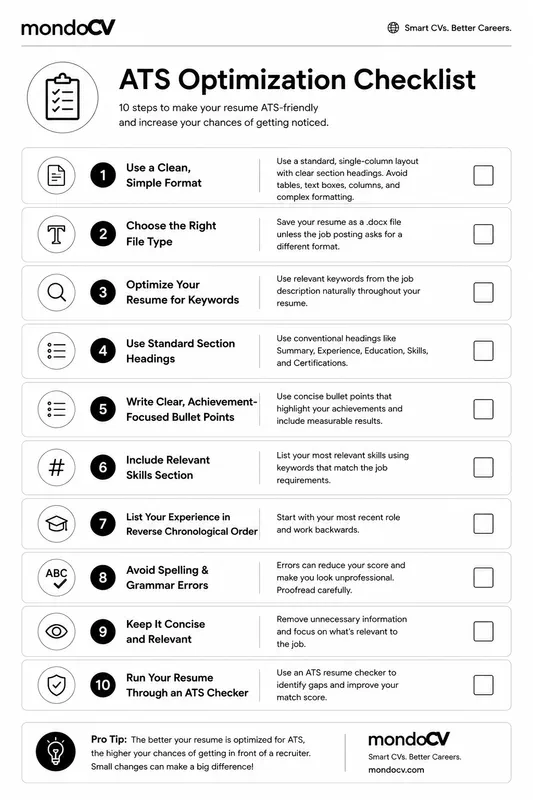
ATS Optimization Checklist
Before submitting your next application, run through this checklist:
- File format: PDF (unless the posting specifically requests DOCX)
- Layout: Single column, no tables, no text boxes
- Font: Standard font (Arial, Calibri, Georgia), 10-12pt
- Headings: Standard section names (Work Experience, Education, Skills)
- Contact info: In the document body, not in header/footer
- Keywords: Job description terms used naturally throughout
- Dates: Consistent format (Month Year - Month Year)
- Achievements: Quantified with numbers and percentages
- Length: 1-2 pages for most professionals
- File name: "FirstName-LastName-Resume.pdf" (professional and searchable)
Common ATS Myths Debunked
"ATS can't read PDFs"
Myth. In 2026, virtually all major ATS platforms parse PDFs correctly. The exception is image-based PDFs (scanned documents without embedded text). As long as your PDF contains real, selectable text -- which it will if created from a word processor or a tool like mondoCV -- it will parse fine.
"I need to submit a plain text resume"
Myth. Plain text strips away all formatting, making your resume harder to read when it does reach a human reviewer. A cleanly formatted PDF strikes the right balance between ATS compatibility and visual appeal.
"Applicant tracking systems only look for exact keyword matches"
Partially true. While older systems relied on exact matching, modern ATS platforms use semantic analysis to understand related terms. However, exact matches still score higher than synonyms, so mirroring the job description's language remains the best strategy.
"A creative design will make my resume stand out"
Risky. Creative designs stand out -- in the rejection pile. Save visual creativity for your portfolio or personal website. Your resume's job is to pass the ATS and communicate your qualifications clearly to a recruiter who will spend 6-8 seconds scanning it.
Build Your ATS-Friendly Resume with mondoCV
Creating an ATS-optimized resume doesn't mean starting from scratch or sacrificing design quality. mondoCV offers professionally designed templates that are built from the ground up to be ATS-compatible:
- Clean, single-column layouts that parse correctly across all major ATS platforms
- Standard section headings that ATS systems recognize instantly
- PDF export with real, selectable text -- never image-based
- Multiple templates so you can choose a design that is both visually polished and fully ATS-friendly
- Real-time editing -- update your resume for each application in minutes, tailoring keywords to each job description
Stop guessing whether your resume will pass ATS screening. Create your free ATS-optimized resume with mondoCV and make sure your qualifications reach the people who matter.
Was this article useful?
Your feedback helps us improve future CV and career guides.
Comments (0)
Loading comments...
More articles like this
All articlesThe 2-Page Resume Myth: Why Two Pages Are the New Standard in 2026
Discover why the two-page resume is becoming the new standard in 2026. Learn when to use one page versus two and how to make every page count.
Read the guideResume Summary Examples for 2026: How to Write a Professional Summary That Gets Interviews
Learn how to write a professional resume summary that highlights your skills, experience, and achievements while improving your chances of passing ATS screenings and impressing recruiters.
Read the guide